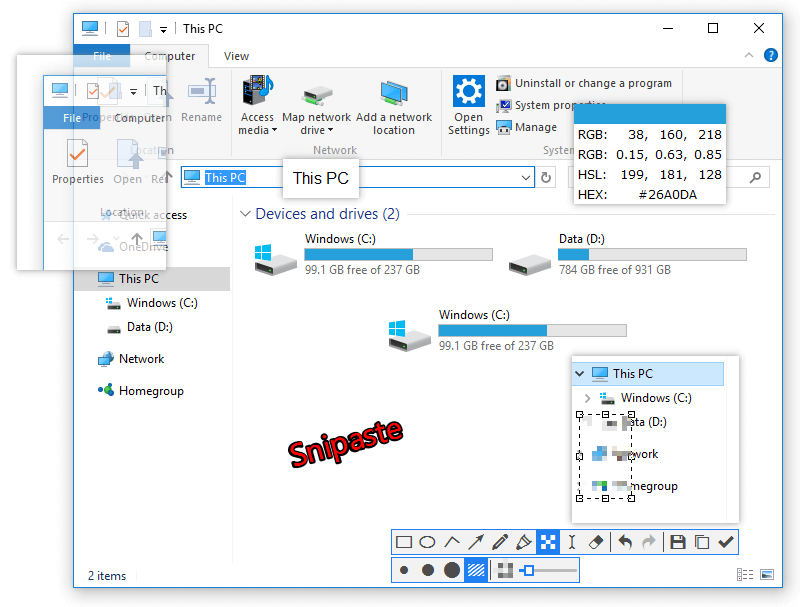
If you are still using the default Windows Snipping Tool, you are missing out on a massive productivity boost. Snipaste (Snip + Paste) is widely considered the king of screenshot tools for Windows and macOS. It’s fast, lightweight, and features a unique “Pin” function that will change how you work.
🌟 The Killer Feature: “Pinning” (F3)
The most famous feature of Snipaste is the ability to “Paste” a screenshot as a floating window back onto your screen.
- How it works: You snip something (F1), and instead of just saving it, you press F3. The image stays on top of all other windows.
- Why it’s useful: Imagine you are a programmer referencing API documentation, or a student taking notes from a PDF. You can pin the reference image right next to your code or editor. No more Alt-Tabbing back and forth!
🔥 Key Features
- Pixel-Perfect Snapping: Automatically detects UI elements (windows, buttons, panels) with extreme precision.
- Rich Annotation: Quickly add arrows, shapes, blur, or text. The UI is clean and doesn’t clutter your screen.
- Color Picker: While snipping, press C to copy the HEX or RGB color code of any pixel under your cursor.
- Multi-Screen Support: Works flawlessly across multiple monitors with high-DPI support.
- Pure & Lightweight: No background ads, no extra bloatware, and very low memory usage.
⌨️ Essential Shortcuts
Mastering Snipaste is all about these three keys:
| Shortcut | Action |
|---|---|
| F1 | Snip: Start a new screenshot. |
| F3 | Paste/Pin: Turn your screenshot into a floating window. |
| Esc | Cancel: Exit snipping or close a pinned image. |
Pro Tip: While snipping, use the Mouse Wheel to adjust the thickness of your drawing pen.
🆚 Snipaste Free vs. Pro
Snipaste offers a Pro version on the Microsoft Store, but for 99% of users, the Free version (available on their website) is more than enough.
| Feature | Free Version | Pro Version |
|---|---|---|
| Basic Snipping & Pinning | ✅ Yes | ✅ Yes |
| Commercial Use | ❌ No | ✅ Yes |
| Advanced Grouping | ❌ No | ✅ Yes |
| Annotation Highlighting | ✅ Yes | ✅ Yes |
SoftStash Verdict
Rating: ⭐⭐⭐⭐⭐
Snipaste is one of the few tools that once you try it, you can never go back. It is a “Gold Standard” utility that makes your daily computer use significantly smoother. At SoftStash, we recommend this as a Day 1 installation for any clean Windows setup.
Download
Download Snipaste Free for Windows/Mac
Note: For the best experience, download the Standalone (Zip) version for a truly portable and clean installation.